

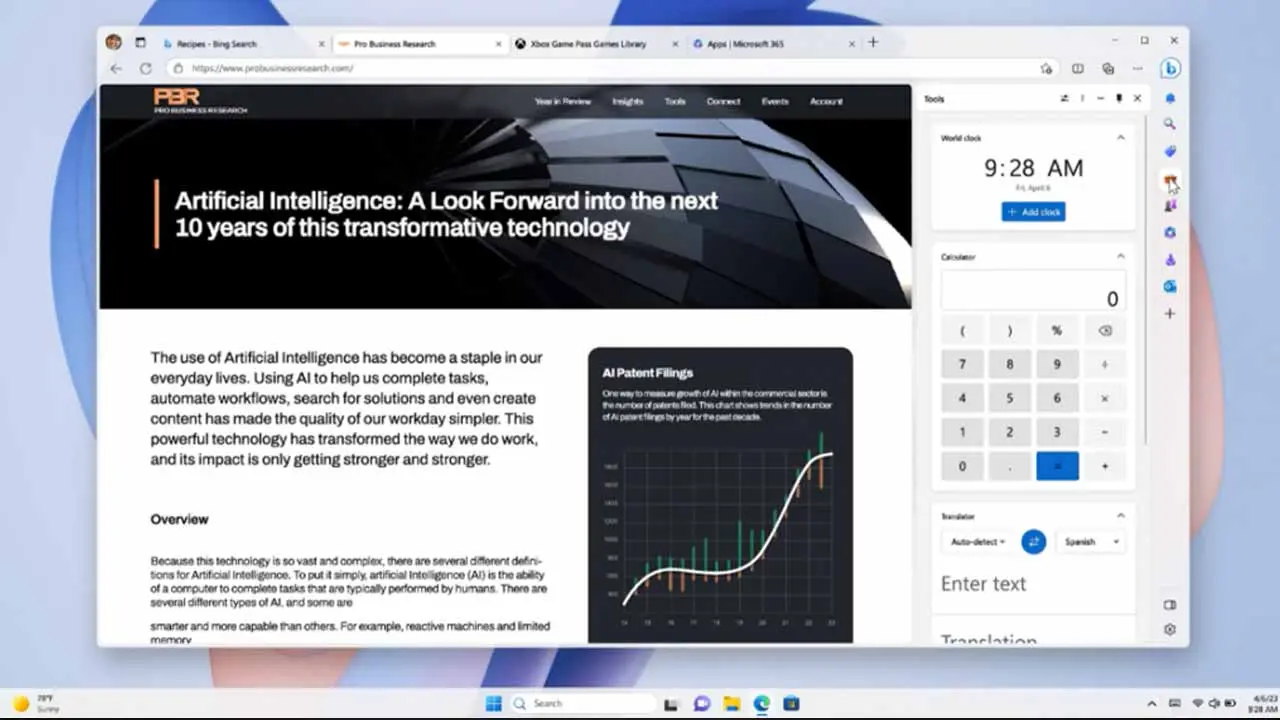
Inbizzy, Barcelona, — Microsoft has officially introduced Copilot Mode in its Edge browser, a breakthrough innovation powered by artificial intelligence (AI) that redefines how users interact with the web. This experimental feature is now available for free, for a limited time, across all Copilot markets exclusively on Windows and Mac platforms.
From Click to Collaboration: A Shift in Browser Experience
For decades, browsing the web has followed a linear path: open a tab, search, read, repeat. But now, Microsoft is transforming that model. With Copilot Mode, Edge becomes an intelligent assistant—one that understands context, streamlines tasks, and actively supports users in navigating the digital world more efficiently.
Key Features of Copilot Mode in Microsoft Edge
Microsoft’s Copilot Mode is not just another add-on—it’s a foundational shift in web interaction. Built with advanced AI capabilities, here are the flagship features that set it apart:
1. Intelligent Multi-Tab Context Awareness
Copilot Mode allows users to give permission for the AI to view all open browser tabs, providing full context across research or comparison tasks.
Example Use Case:
Searching for flights, hotels, and tour packages across multiple sites? Copilot can suggest the best combination based on location, pricing, and amenities—then display it in a single organized view.
Benefit: Make smarter, faster decisions without exhausting tab switching.
2. Natural Voice Navigation & Hands-Free Interaction
Speak directly to Copilot using natural language. No more typing or scrolling—just say:
“Compare latest smartphone prices”
or
“Show me articles on AI business trends”
Copilot will open relevant tabs, highlight key content, or even summarize it on demand.
Benefit: Better accessibility, ideal for multitasking and users with limited mobility.
3. Context-Aware Actions for Smarter Browsing
With user-granted permission, Copilot can access your browsing history, saved preferences, and credentials to carry out complex tasks.
Example Use Case:
Ask: “Find paddleboard rentals near my office for 10 AM tomorrow.”
Copilot will:
- Check local weather
- Make the booking (if permitted)
- Suggest sunscreen or tutorial videos
Benefit: A new level of web automation—planning, executing, and completing tasks in one go.
4. Distraction-Free Dynamic Side Panel
Copilot appears in a collapsible side pane that doesn’t obstruct your main page. Use it to:
- Translate content instantly
- Convert cooking measurements in real-time
- Summarize long blog posts or articles
- Skip distracting ads or pop-ups
Benefit: Stay focused and get what you need, without leaving your current page.
5. Pick Up Where You Left Off (Topic-Based Journeys)
Copilot intelligently organizes your browsing into themed “journeys”—grouping past and present activity under topics like:
- Starting a business
- Planning a vacation
- Comparing gadgets
It then suggests:
- Related tutorials
- Relevant YouTube videos
- Tools or templates
Benefit: No need to restart your search. Continue projects smoothly and stay focused.
6. Transparent Privacy and Full User Control
Every Copilot action is accompanied by clear visual indicators. Your data:
- Is never accessed without consent
- Is not shared with third parties
- Is governed by Microsoft’s Privacy Statement
Benefit: AI-powered browsing with the security and transparency you expect from Microsoft.
Microsoft emphasizes that Copilot Mode is opt-in only. You can enable or disable it anytime through Edge settings. Data is only processed when authorized and never shared without explicit permission. The experience is grounded in Microsoft’s privacy and compliance standards, trusted by users worldwide.


